

Description
Download Avdshare Video Converter – Video and Audio Format Conversion Tool
Overview
Avdshare Video Converter is a comprehensive multimedia utility designed to simplify video and audio file management for users across various platforms. The application serves as an all-in-one solution for converting, editing, and playing a wide range of media formats. It is particularly useful for individuals who frequently work with diverse file types and require efficient tools to handle media without switching between multiple applications. The software is tailored for users managing large media libraries, content creators, educators, and anyone seeking seamless compatibility across devices.
By supporting formats such as WTV, AVCHD, MP4, FLV, MP3, AAC, and others, Avdshare Video Converter eliminates compatibility barriers that often hinder media workflows. Its ability to convert files into device-specific formats makes it ideal for preparing content for playback on iPhones, iPads, Android smartphones, and gaming consoles. The tool also enables direct playback of supported files, allowing users to preview content before processing—enhancing workflow accuracy and reducing errors.
The developer did not provide additional technical details about the company or its background. However, the app's release date of January 17, 2024, indicates it is a current, actively maintained tool. It plays a significant role in the desktop media ecosystem by offering a unified platform for conversion and editing, reducing dependency on multiple specialized tools. While the provided information does not confirm mobile availability, its functionality is clearly optimized for Windows environments.
Key Features & Functionality
- Extensive Format Support: Avdshare Video Converter handles a broad spectrum of video and audio formats, including WTV, AVCHD, MP4, FLV, MP3, AAC, and more. This ensures compatibility with both common and niche file types, minimizing the risk of conversion failure due to unsupported formats.
- Batch Conversion Capabilities: Users can process multiple files simultaneously by selecting a folder and applying consistent conversion settings. This feature significantly reduces processing time, especially when managing large collections of media files.
- Advanced Editing Tools: The software includes trimming, cropping, rotating, merging, and subtitle addition. These tools allow users to refine raw footage or audio without requiring external editing software, streamlining the production workflow.
- Direct Playback Functionality: The built-in player enables users to preview files directly within the app. This helps verify content integrity and ensures accurate editing or conversion decisions before processing.
- Device Compatibility Optimization: Files can be converted to formats compatible with specific devices, including iPhones, iPads, Android devices, and game consoles. This ensures seamless playback across platforms, enhancing user experience and sharing efficiency.
For example, a content creator preparing a video for a client can use the batch conversion feature to convert multiple clips to MP4 format for easy sharing. A teacher might use the trimming and merging tools to compile educational segments into a single file. The direct playback function allows users to verify each file’s quality before finalizing the output, ensuring professional results.
Interface, UX & Performance
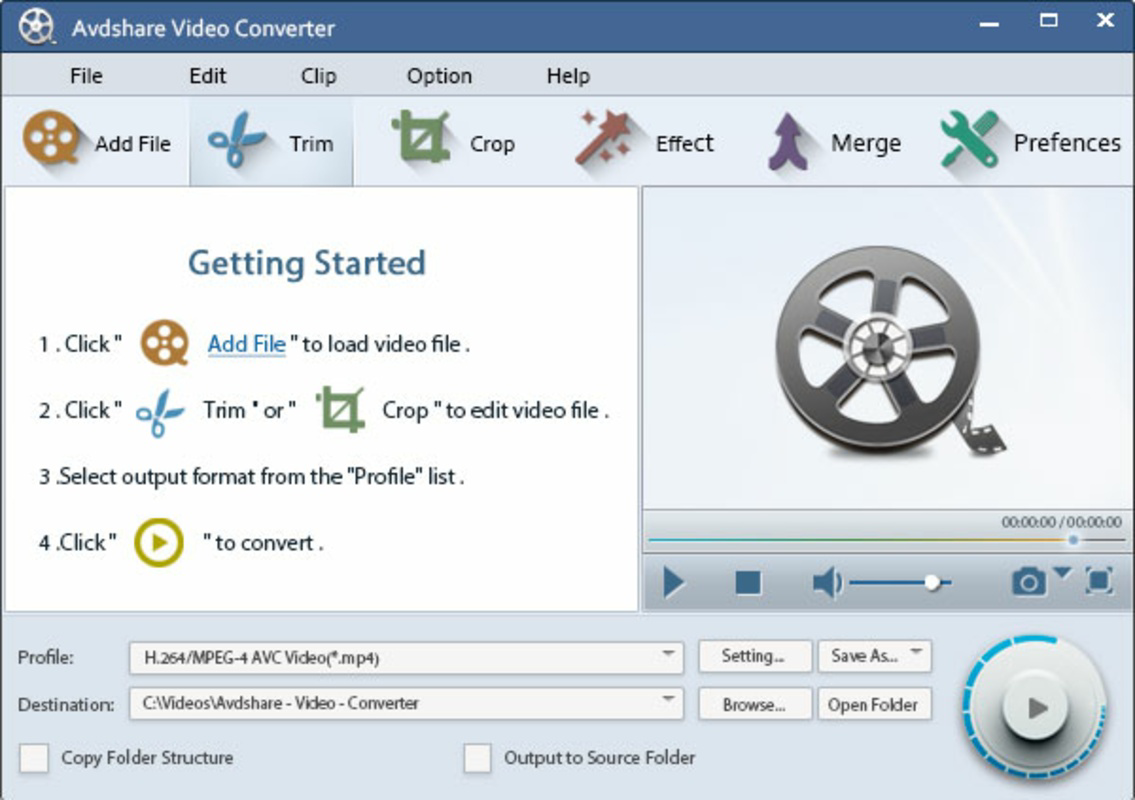
The user interface of Avdshare Video Converter is designed with usability in mind, featuring a clean layout that organizes tools into logical sections. Navigation is straightforward, with clearly labeled buttons and intuitive workflows for conversion and editing tasks. The visual style emphasizes functionality over ornamentation, making it easy for users to focus on their media files without distraction.
Users can drag and drop files into the interface or browse folders to load content. Conversion settings are accessible through dropdown menus and customizable parameters, allowing for precise control over output quality, resolution, and format. The application supports real-time preview during editing, enhancing user confidence in the final output.
Although the developer did not list formal performance metrics, the app is described as efficient and user-friendly. It is optimized for Windows systems, suggesting stable operation across various device categories, including laptops, desktops, and high-performance machines. Responsiveness appears to be consistent, with minimal lag during file loading and processing. Stability is implied through the seamless integration of playback, editing, and conversion functions.
Platform Compatibility & Technical Requirements
Avdshare Video Converter is available for Windows operating systems. The software version is not specified, and the file size is not listed. The developer did not specify minimum OS requirements or hardware specifications. Compatibility information was not fully disclosed.
Given the application’s focus on Windows, it is likely designed for desktop environments. No information is provided regarding mobile availability, APK downloads, or iOS support. Users should verify system compatibility with their current Windows version before installation. The lack of detailed technical data means users should proceed with caution and ensure their system meets general Windows application requirements.
Pros and Cons
Pros
- Supports a wide range of video and audio formats, ensuring high compatibility
- Enables batch conversion for efficient processing of multiple files
- Includes built-in editing tools like trimming, cropping, and merging
- Offers direct playback functionality for file previewing
- Converts files to device-specific formats for cross-platform compatibility
Cons
- Developer did not provide detailed technical specifications or system requirements
- Platform availability beyond Windows was not confirmed
- No information on update frequency or future development plans
- Performance metrics were not disclosed
- Compatibility with older Windows versions is unclear
FAQ
Is Avdshare Video Converter safe to download and install?
Yes, the application is designed for Windows and is intended to be a secure tool for media conversion. As with any software, users should download from official sources to avoid third-party modifications.
Can I use Avdshare Video Converter on Android or iOS devices?
The developer did not confirm mobile availability. The tool is primarily designed for Windows systems. There is no evidence of an Android or iOS version at this time.
Does Avdshare Video Converter support 4K video conversion?
The application supports a wide range of formats, but specific details on 4K resolution handling were not provided. Users should test with their files to determine compatibility.
How often is Avdshare Video Converter updated?
The developer did not disclose update frequency. The latest version was released on January 17, 2024, but ongoing maintenance schedules are not specified.
Can I convert videos to formats suitable for gaming consoles?
Yes, Avdshare Video Converter is designed to convert files into formats compatible with various devices, including game consoles. Specific output formats may vary based on console requirements.
Final Thoughts
Avdshare Video Converter stands out as a reliable, feature-rich tool for users seeking a unified solution for video and audio conversion and editing. Its extensive format support, batch processing, and built-in editing capabilities make it a valuable asset for content creators, educators, and everyday users managing digital media. The direct playback function adds a layer of convenience, allowing for real-time verification of content before conversion.
While the lack of detailed technical specifications and mobile availability limits some use cases, the app’s core functionality remains strong and focused. For Windows users needing a secure, efficient, and versatile media tool, Avdshare Video Converter offers a compelling value proposition. Its ability to simplify complex workflows without requiring multiple applications makes it a standout choice in the utility space.
Download Avdshare Video Converter now
Guides & Tutorials for Avdshare Video Converter
How to install Avdshare Video Converter
- Click the Preview / Download button above.
- Once redirected, accept the terms and click Install.
- Wait for the Avdshare Video Converter download to finish on your device.
How to use Avdshare Video Converter
This software is primarily used for its core features described above. Open the app after installation to explore its capabilities.
User Reviews for Avdshare Video Converter 0
No reviews found


